The Dustlight Personal Dust Monitor: Setup, Software, and Accessories
Everything a UK site manager or health and safety officer needs to know, from first charge to multi-site workforce deployment.
Why construction dust monitoring matters
The Health and Safety Executive estimates that around 12,000 people in the UK die every year from lung diseases linked to past workplace exposures. Construction dust accounts for a significant proportion of those cases. Silica dust, released when cutting, grinding, or drilling concrete, stone, and masonry, is the single biggest occupational health risk in construction after asbestos.
The problem is that most of the dust that causes serious lung disease is invisible. Fine respirable particles pass through the air and into the lungs without the worker being aware of any exposure at all. By the time symptoms appear, often years or decades later, conditions such as silicosis, lung cancer, and chronic obstructive pulmonary disease may already be advanced.
Under the Control of Substances Hazardous to Health Regulations 2002 (COSHH), UK employers are legally required to assess the risk from airborne hazardous substances, put in place appropriate controls, and monitor their effectiveness. Respiratory protective equipment is part of that control hierarchy, but only if workers actually wear it, at the right time, in the right environment.
That is the gap the Dustlight addresses. Workers cannot respond to exposure they cannot see. A device that detects dust in real time and alerts the wearer to put on their respiratory protective equipment changes that equation.
What is the Dustlight?
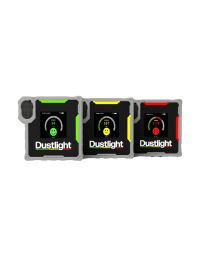
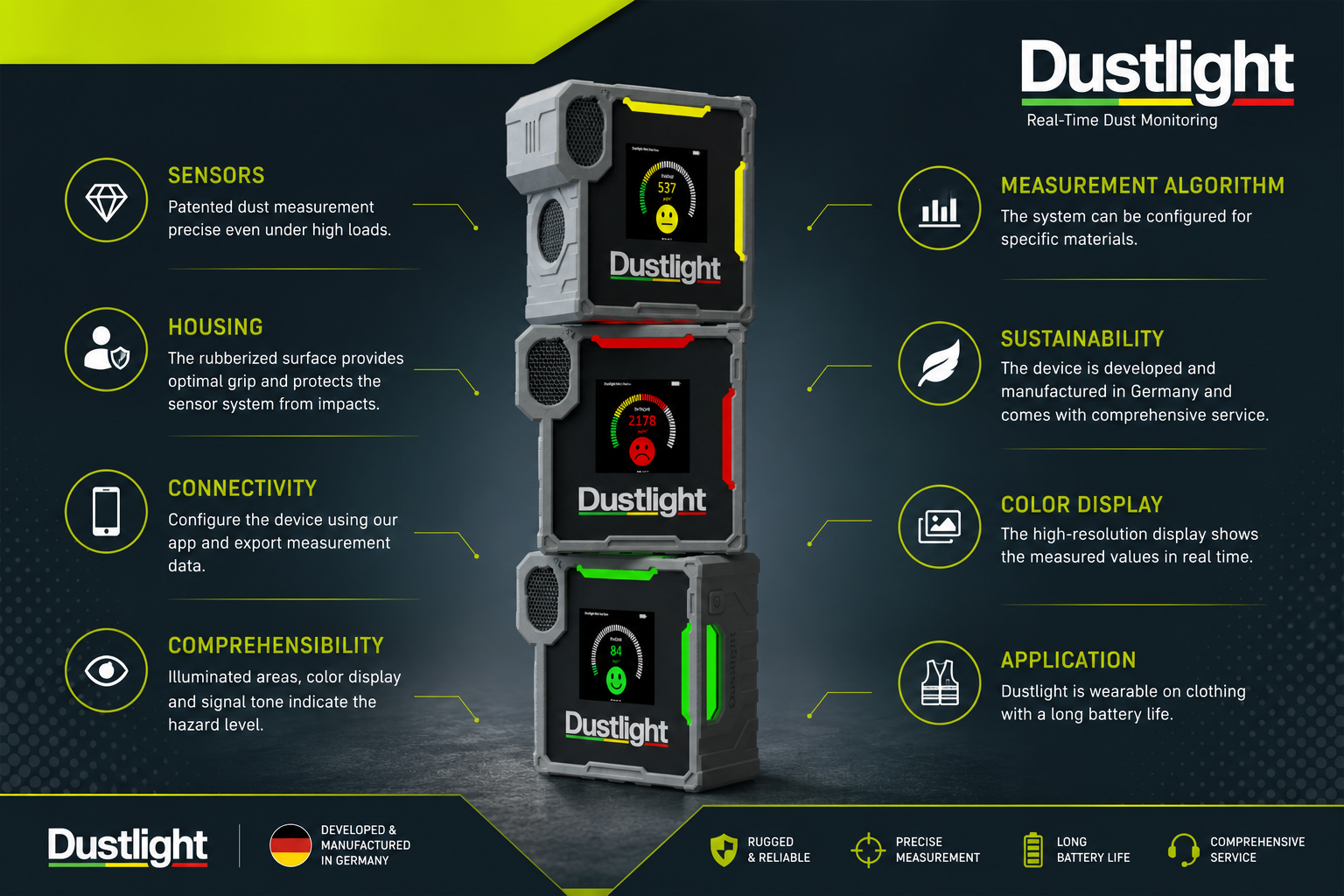
The Dustlight is a wearable personal dust monitor designed for commercial and industrial environments. It measures the concentration of respirable dust, PM1, PM2.5, and PM10 fine particles in real time using photometric laser-based sensing. Readings update continuously during the shift, and the device alerts the wearer via a colour-coded LED display and an audible alarm when concentrations rise above configured thresholds.
The device is worn directly on the body using the built-in Klick Fast mounting system on its back, replaced with a Klick Fast connector in place of the standard clip, and attached to a chest harness, armband, or belt mount. This keeps the sensor close to the airways throughout the shift, which is where personal exposure actually occurs.
How the patented sensor protection system works
One of the Dustlight's most significant engineering features is its patented sensor protection system, designed to maintain measurement accuracy over the full service life of the device, even in environments with very high dust concentrations.
Three mechanisms work together to keep the optical measuring unit clean:
- Filtered air curtain: A curtain of filtered air shields the laser sensor from the incoming dusty air stream, preventing particles from settling directly on the optical components.
- Pre-separation chamber and stainless steel pre-filter: Coarse particles are separated before the airflow reaches the sensor, reducing the load on the optical measurement unit.
- Self-cleaning cycles: The device runs automated cleaning cycles to reduce deposits on sensor surfaces between measurements.
This system is why the Dustlight maintains measurement accuracy across its service life without requiring user calibration between annual maintenance intervals. Devices used in extremely dusty environments, foundries, abrasive blasting, heavy concrete cutting, may reach their maintenance threshold sooner than 12 months.
Key specifications at a glance
The Dustlight samples the air within approximately one cubic metre of the device, so the readings shown represent the dust concentration in the immediate space around the wearer, closely reflecting what is actually being breathed in.
| Specification | Detail |
|---|---|
| Particle detection | PM1, PM2.5, PM10, respirable dust (A-dust) |
| Measuring method | Photometric (laser-based) |
| Sampling area | Approximately 1m³ of air surrounding the device |
| Measuring range | 0 to 10,000 µg/m³, resolution 1 µg/m³ |
| Particle size range | 0.3 to 10 µm |
| Display | 1.54" LCD colour display, RGB LED luminous areas |
| Alerts | Visual (LED + display), audible beeps, app notifications |
| Connectivity | Bluetooth (Dustlight app, iOS and Android) |
| Battery | 3.7V lithium-ion, 1700 mAh, up to 7 / 20 / 40 hours depending on mode |
| Charging | Magnetic USB cable (included), 5V 1A USB power adapter |
| Operating temperature | -10°C to +40°C |
| Charging temperature | 0°C to +30°C |
| Humidity | 0 to 80% RH, non-condensing |
| Operating pressure | 700 to 1100 hPa (approx. -300 to +3000m above sea level) |
| Dimensions | 69 x 69 x 32.5mm (without clip) |
| Weight | 149g |
| Housing | PC/ABS base housing, TPU protective layer |
| Certifications | CE, UKCA, FCC, IC (EN 61010-1) |
| Measurement type | Indicative (not gravimetric) |
| Country of manufacture | Germany (Latai GmbH, Munich) |
Certifications and compliance
The Dustlight carries CE and UKCA markings for the European and UK markets. It is also certified under cTUVus, the North American conformity mark monitored through regular production audits by TÜV SÜD. This certification is relevant for UK procurement teams working with global supply chains or buying for sites in multiple countries, as it confirms the product meets stringent independent safety verification beyond self-declaration.
The Dustlight app and cloud platform are GDPR compliant. All data transfers are end-to-end encrypted. Measurement data is owned by the organisation using the platform and is not shared with third parties.
Important: what indicative measurements mean
The Dustlight provides indicative measurements. It must not be used as the sole basis for formal compliance monitoring against occupational exposure limits under COSHH Regulations 2002 or HSE EH40. Where legally binding dust measurements are required, accredited gravimetric sampling by a qualified occupational hygienist remains the required method.
This distinction matters, and it is worth understanding what indicative measurement actually means in practice.
The Dustlight uses photometric sensing, a laser illuminates particles passing through the sensor, and the scattered light is measured to calculate concentration. This method gives continuous real-time data and responds quickly to changes in dust levels. However, it does not have the measurement certainty of gravimetric sampling, where a known volume of air is drawn through a filter that is then weighed in a laboratory.
In the UK, formal compliance with workplace exposure limits (WELs) listed in HSE EH40, for substances including silica, hardwood dust, and other hazardous dusts, requires gravimetric sampling carried out or overseen by a competent person, typically an occupational hygienist.
That said, the Dustlight is a genuinely valuable part of a COSHH compliance programme. It is designed to:
- Give workers real-time awareness of dust levels during a task
- Prompt the use of respiratory protective equipment at the right moment
- Support the continuous monitoring of engineering controls and ventilation
- Identify dust hotspots and high-risk work activities across a site
- Generate exposure data records to support risk assessments and management decisions
Used alongside, not instead of, formal assessment, it is a tool that can meaningfully improve RPE compliance and reduce unnecessary exposure.
What industries use the Dustlight?
The Dustlight is used wherever airborne dust presents a risk to worker health. The following industries are the primary applications.
Specific applications beyond personal protection
Beyond alerting individual workers to put on their masks, the Dustlight data is used by site managers and HSE teams for a wider set of operational decisions.
- Evaluating extraction and ventilation systems: Running the Dustlight before and after switching on LEV (local exhaust ventilation) gives a clear, real-time picture of whether the system is working as intended. The 8-hour history graph on the device and the full measurement data in the app make before-and-after comparisons straightforward.
- Identifying dust sources and hotspots: Moving a Dustlight through different zones on a site, or between different workstations in a workshop, quickly identifies where dust concentrations are highest. This supports targeted control measures rather than blanket PPE requirements.
- Analysing concentration trends over time: The app's measurement history shows how dust levels change throughout a shift, between tasks, and across different working conditions. This is useful for understanding whether engineering controls are deteriorating over time.
- Qualitative assessment of dust-intensive work processes: Comparing readings between different cutting methods, saw types, or drilling speeds supports evidence-based decisions about which work processes carry the most risk.
- Supporting risk assessments under COSHH: The Dustlight does not replace a formal COSHH assessment, but the data it generates provides useful supporting information for the written assessment and ongoing review of control measures.
First setup: out of the box
The Dustlight arrives ready for use. No assembly or calibration is required before first use. There are three tasks to complete before deploying the device on site for the first time.
Charge the battery fully
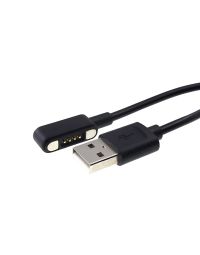
Connect the included magnetic USB charging cable to the device's four-pin charging port on the underside. Connect the other end to a 5V 1A USB power adapter. The device can be in measuring mode or standby during charging. Charge at ambient temperatures between 0°C and +30°C. Do not charge at temperatures outside this range. A full charge takes approximately three hours.
Attach a Klick Fast connector (if using body-worn accessories)
The Dustlight ships with a plastic clip that attaches to clothing. To use the Klick Fast body-worn accessories, harness, armband, or belt mount, the clip must be replaced with a Klick Fast connector. Loosen the Phillips screw on the back of the device anticlockwise, remove the clip, and insert the Klick Fast connector into the cloverleaf-shaped recess in the orientation shown in the assembly diagram. Make sure the U-shaped opening points towards the top of the device. Tighten the supplied screw clockwise. Only use the screws supplied. Do not use permanent locking varnish.
Power on
Press and hold the single button on the right-hand side of the device for at least two seconds. The display activates and the sensor begins its 30-second warm-up period before providing the first stable reading. The device is ready to use after this period.
Inspect the air inlet grille before each use
The stainless steel air inlet grille on the front of the device is the sensor's air intake. Check it is free from visible dirt or damage before each shift. Paint residue, dried concrete, or other blockages affect measurement accuracy. Clean with a damp cloth or brush. The grille can be removed for washing. See the Maintenance section for cleaning instructions.
The Dustlight is not waterproof. Protect the device from rain, splash water, and environments with excessive humidity. Do not submerge the device. Use the IP67 carry case for outdoor transport and storage.
Setting up the Dustlight app
Without the app, the Dustlight functions as a standalone measuring device, it measures, displays, and alerts. With the app, it becomes a managed compliance tool: data is logged and exported, limits are configured for specific materials, operating mode is set, and multiple devices can be managed from a single account.
The app is free to download. Search for Dustlight on the Apple App Store (iOS) or Google Play (Android). It is also accessible as a browser-based web app at app.dustlight.com, no download required for desktop use.
Create a free account
Open the app and tap "Create new account." Enter your name and company email address, set a password, and accept the terms and conditions. A confirmation email will be sent, click the link to activate the account. You are then automatically on the Basic plan.
Connect the Dustlight via Bluetooth
Switch on the Dustlight. In the app, go to the Connect screen and tap the green search button. The Dustlight appears in the device list once its Bluetooth wireless connection is active (within five minutes of switching on, or immediately after pressing the side button). Select your device, it flashes blue on the display and shows a connection request. Press the side button on the Dustlight to confirm. The connection is established.
Select and verify the operating mode
In the Device Settings menu in the app, confirm the operating mode that suits your deployment. Standard Battery Life is the default and runs for up to 20 hours. See the Battery Modes section for a full comparison.
Configure alert thresholds for your dust type
The default configuration measures general dust. For sites handling silica, hardwood, welding fumes, or other specific materials, configure the appropriate material configuration in the app. The Business and Corporate software plans include additional material configurations. Always verify that the limit values set correspond to the relevant UK workplace exposure limits for the specific substances present on site.
The app regularly syncs data to the smartphone when a Bluetooth connection is active. If the internal memory of the device fills (E07 error), connect via the app to sync and clear the memory. The device stores approximately six months of measurement data internally.
Setting UK limit values
Units supplied by CMT Group are preset to United Kingdom limit values, so no country change is required on first connection. You can still adjust the warning threshold and limit value manually in the Device Settings menu to match specific materials or site requirements.
| Default setting | Concentration | Action |
|---|---|---|
| Warning threshold (yellow) | 125 µg/m³ | Take preventive action to reduce dust release |
| Limit value (red) | 1250 µg/m³ | Put on RPE immediately if exposure cannot be stopped |
The default limit values pre-loaded at delivery are reference values only. The responsibility for researching and correctly setting the limit values for specific substances in use on site lies with the operator, not the manufacturer. Always cross-reference with the current HSE EH40 Workplace Exposure Limits document for the specific substances being monitored. EH40 is available free of charge from HSE.gov.uk.
Software plans explained
The Dustlight app runs on three software plans. The Basic plan is included with every device purchase at no extra cost. The Business and Corporate plans require a paid software licence, purchased as a token from CMT Group and redeemed via the app.
- ✓ Real-time PM1, PM2.5, PM10, respirable dust display
- ✓ Measurement history stored locally on smartphone
- ✓ CSV data export
- ✓ Configuration of alert limits and operating mode
- ✓ Graphical visualisation of measurement values
- ✓ Firmware updates over the air
- ✓ Sensor maintenance tracking
- ✓ Everything in Basic
- ✓ Cloud storage with unlimited capacity
- ✓ Access to data across all devices
- ✓ Dustlight web app for analysis on larger screens
- ✓ STEL and TWA exposure monitoring
- ✓ Event logging (exceedances, warnings, incidents)
- ✓ Additional material configurations: wood dust, welding fumes, diesel particulate, oil mist
- ✓ Everything in Business
- ✓ Long-term analytics across teams and time periods
- ✓ Fleet management for large numbers of devices
- ✓ Creation and management of teams, roles, and hierarchies
- ✓ Centralised data access across the organisation
For most UK construction businesses deploying between one and ten Dustlight units, the Business plan provides the right balance of functionality and cost. The STEL (short-term exposure limit, 15-minute average) and TWA (time-weighted average, 8-hour shift average) monitoring in the Business plan are particularly relevant to UK COSHH compliance, where both short-term and long-term exposure limits apply to many hazardous substances.
Contact CMT Group for Business and Corporate licence pricing and to obtain software tokens for your organisation.
Licences and organisations
If you are running the Basic plan, no licence management is required. This section covers Business and Corporate plan setup for organisations deploying multiple devices.
Software licences are consumed by devices, not by the people using them. One user connecting four Dustlight units still requires four licences, one per device, regardless of how many people are assigned to use them.
Setting up your organisation
One person sets up as the first administrator
In the app Settings menu, tap "Upgrade Plan / Join Organisation" and follow the Start Assistant. Select "No" when asked if someone from your company is already using Dustlight Software Plans, this sets up a new organisation. You become the first admin automatically.
Enter your organisation name and software token
Choose a name for your organisation, typically your company name. Enter the 12-digit software token provided by CMT Group when you purchased the Business or Corporate licence. The organisation is created and the licence is activated immediately.
Add licences for each Dustlight device
Go to App Settings, then Licence Management, and tap "+ Add New Licence." Enter each licence token. Licence duration is set at the point of purchase based on your original order with CMT Group and can be issued for one, three, or five years, running from the date the token is entered rather than the date of purchase. By default, CMT issues one-year licences unless a longer term is specifically requested. Licences are managed at organisation level and can be reassigned between devices, but each device connected to a Business or Corporate plan requires its own licence.
Invite team members
In App Settings, go to User Management and tap "Invite New User." Enter the email address of each team member. They receive an invitation via the app and by email. Once they accept, they join with "User" role. The admin can upgrade any user to "Admin" role, giving them the ability to invite new users and manage licences.
Connect each Dustlight device to the organisation
Each team member connects their Dustlight device via the app. On first connection, they select an unassigned licence from the organisation's licence pool. Once assigned, the device is linked to the organisation and its data is protected from access by other organisations.
A Dustlight device can only be used within the organisation it is assigned to. To move a device to a different organisation, it must first be removed via App Settings, Licence Management. This frees the licence for reallocation but does not delete the measurement data stored on the device. If data deletion is required, a factory reset must be performed in device settings.
Wearing the Dustlight on site
The Dustlight is designed to be worn on the body, in the breathing zone. For personal exposure monitoring to be meaningful, the sensor needs to be positioned close to the airways, at chest or upper arm height, throughout the shift. Monitoring the device in a pocket or leaving it on a workbench defeats the purpose.
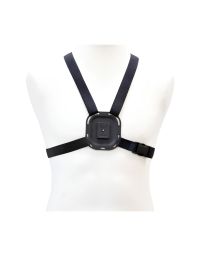
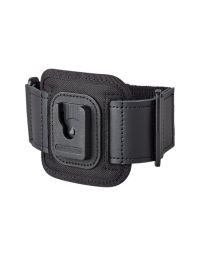
The built-in Klick Fast mounting system on the back of the device enables secure attachment to a range of body-worn accessories without any permanent modification to clothing. To use any Klick Fast accessory, the standard clip must first be replaced with a Klick Fast connector. The Klick Fast system from Peter Jones ILG offers over 20 different clips and fastening options, including belt loops, clothing fastenings, chest straps, wristbands, vehicle dashboard docks, screw-on docks, and MOLLE-compatible mounts. CMT Group stocks the accessories most commonly used with the Dustlight on UK construction and industrial sites.
Step 1: Fit the Go Connector
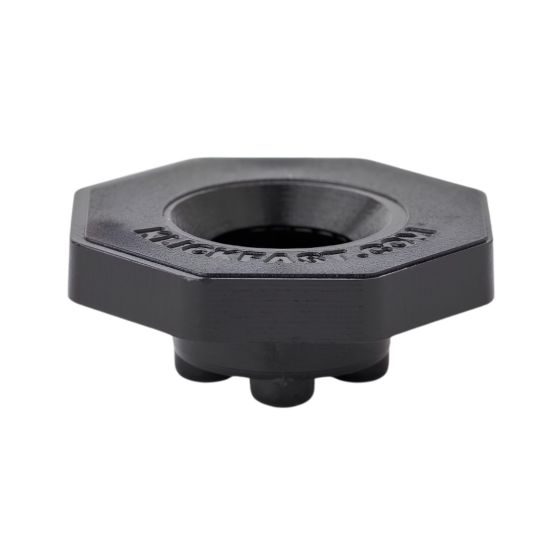
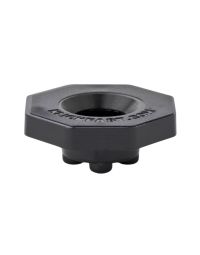
The Klick Fast Go Connector replaces the standard clip on the back of the Dustlight. It is the male connector that slots into any Klick Fast dock or accessory. The Go Connector releases with a direct grab, no inversion or twisting needed, making it the most practical choice for site use where the device is regularly docked and undocked throughout the shift.
To fit: remove the existing clip by unscrewing the Phillips screw anticlockwise. Insert the Go Connector into the cloverleaf recess with the U-shaped opening pointing towards the top of the device. Tighten the supplied screw clockwise. The connector is now ready to use with any Klick Fast accessory.
Step 2: Choose your mounting method
Three body-worn options are available from CMT Group. The right choice depends on the type of work being carried out and the wearer's preference.
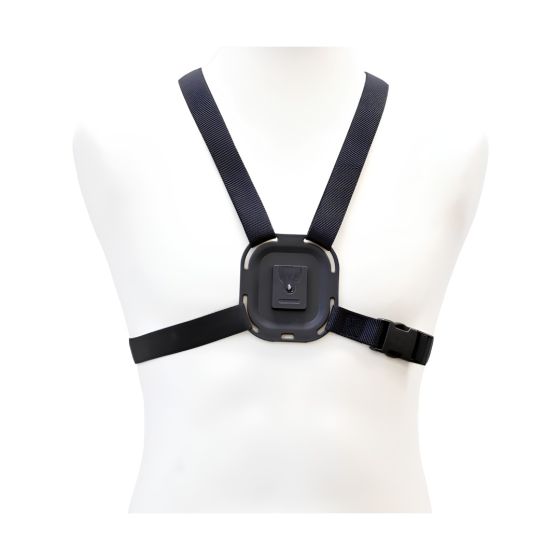
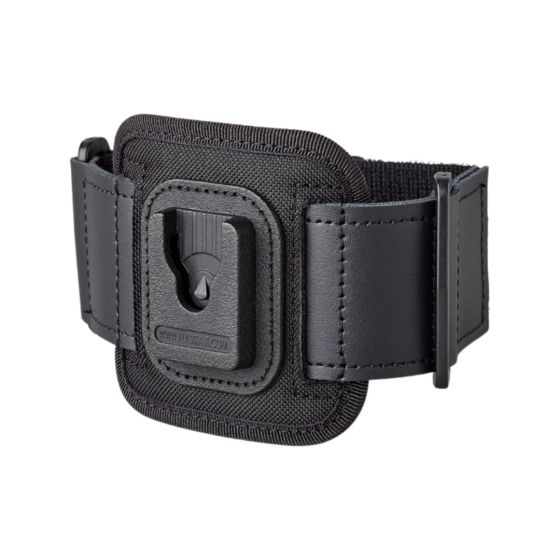
The air inlet on the front of the Dustlight should always face outward, pointing towards the breathing zone. Ensure clothing or other objects do not cover the air inlet or outlet grilles at any time during the shift. A covered inlet gives inaccurate readings.
Not suitable for
- Potentially explosive atmospheres (ATEX environments), the Dustlight is not intrinsically safe
- Rain or splash water, the device is not waterproof
- Temperatures below -10°C or above +40°C in operation
- Healthcare environments, not a medical device; maintain distance from patients and medical equipment
Understanding the display and alerts
LED colour meanings
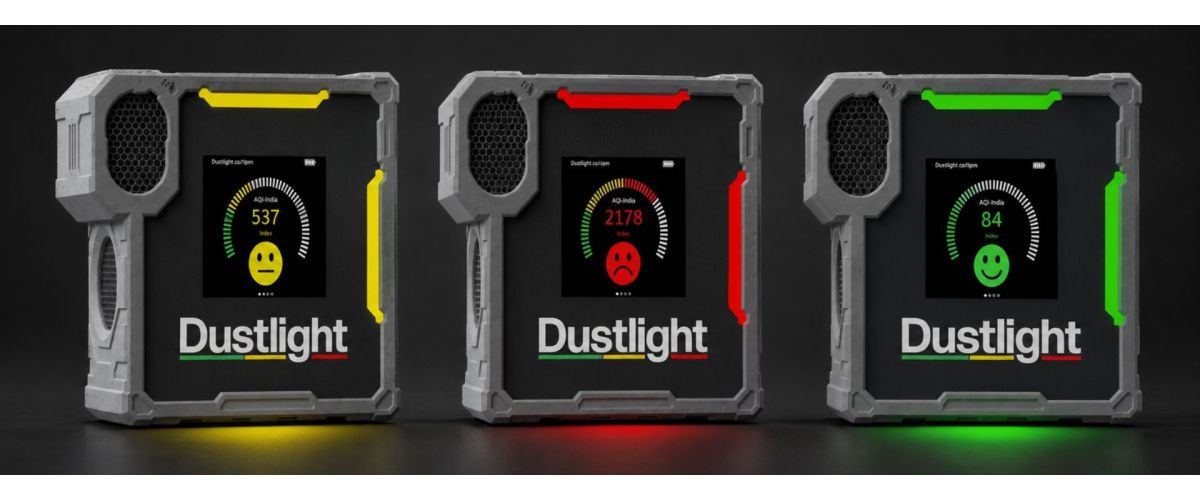
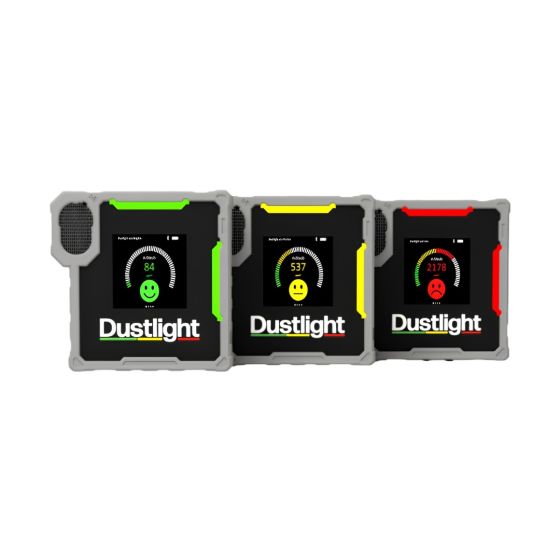
The Dustlight has luminous LED areas on the front, top, and right-hand side of the device, visible from multiple angles, including at a distance. The colour changes as dust concentration changes.
Green: Within limits
Current measured value is below the warning threshold. No action required.
Yellow: Warning threshold reached
Clear exposure to fine dust. Take preventive action now to reduce dust release, improve ventilation, reduce dust generation at source, or consider putting on RPE. One short beep sounds.
Red: Limit exceeded
Dust concentration is at a level harmful to health over the long term. Put on appropriate RPE immediately if exposure cannot be avoided. Leave the area if possible. Three short beeps sound in quick succession.
Blue: Waiting for app connection
The device is waiting for a wireless connection to the Dustlight app to be confirmed. Press the side button on the Dustlight to accept the connection request shown in the app.
Purple: Device error
An error has occurred. Check the display for the error code. See the error code table below and contact the manufacturer if the error persists.
Your Dustlight alerts you to a problem. Your respiratory protective equipment solves it. CMT Group stocks a full range of dust masks, half-face respirators, and disposable FFP2 and FFP3 respirators for construction and industrial environments. Order by 7pm for next-day delivery to site.
The five display screens
Short-press the side button to cycle between the five screens. After the fifth screen, the first screen reappears.
| Screen | What it shows |
|---|---|
| Home screen | Real-time dust concentration (µg/m³), scale display, smiley or warning symbol, and currently selected material configuration. Battery, Bluetooth, and mute status shown in the status bar. |
| PM size breakdown | Current concentration split by particle size fraction: PM1, PM2.5, PM4 (respirable), PM10. |
| 8h graph | Measurement history for the last 8 hours, plotted as a graph. Y-axis scales automatically to peak measurements. Useful for identifying high-exposure tasks during the shift. |
| App / Manual | QR code linking to the Dustlight website, app download links, and manual. Scan to download the app if not already installed. |
| Device info | Software version, operating country, applicable limit values, and date of next maintenance service. |
Devices connected to a Business or Corporate software plan have an additional Exposure Theme screen available, showing STEL (15-minute average) and TWA (shift average dose as a percentage of the limit). This screen replaces the standard home screen and is activated in Device Settings, Theme, Exposure Theme.
Acoustic alert tones
Acoustic warnings can be enabled or disabled in the app. The current mute status is shown in the status bar on the display (mute icon when sound is off).
Error codes
| Code | Error | Action |
|---|---|---|
| E01 | Critical error | Contact the manufacturer or your local service partner. |
| E02 | Sensor error | Restart the Dustlight. If persistent, contact the manufacturer. |
| E03 | No sensor found | Restart the Dustlight. If persistent, contact the manufacturer. |
| E04 | Fan error | Check and clean the air inlet and outlet. Restart. If persistent, contact the manufacturer. |
| E05 | Fan speed error | Check and clean the air inlet and outlet. Restart. If persistent, contact the manufacturer. |
| E06 | Time error | Connect the Dustlight to the app to update the device time. |
| E07 | Memory full | Connect the Dustlight to the app to synchronise data to the smartphone and free device memory. |
| E08 | Maintenance notice (80%) | Sensor approaching service interval. Arrange maintenance at dustlight.de or contact CMT Group. |
| E09 | Maintenance interval reached | Service required immediately. Contact your local service partner or book via dustlight.de. |
Battery modes
The Dustlight has three operating modes that balance measurement frequency, display brightness, and wireless connectivity to extend battery life. The mode is selected in the app and applies to the device until changed.
| Setting | Continuous Battery Life | Standard Battery Life (default) | ECO Battery Life |
|---|---|---|---|
| Battery life | Up to 7 hours | Up to 20 hours | Up to 40 hours |
| Measurement interval (active) | Every second | Every second | Every second |
| Measurement interval (passive) | Every second | Every 60 seconds | Every 60 seconds |
| Switch to passive mode after | 5 minutes | 5 minutes | 30 seconds |
| Wireless connection | Always active | 5 minutes after last button press | 1 minute after last button press |
| Display brightness (active) | High | High | Low |
| Display (passive) | Low brightness | Off | Off |
Which mode to choose
- Continuous Battery Life is suited to tasks where the highest measurement frequency is required and battery life for the full shift is not a concern. Best for short, high-intensity monitoring assessments.
- Standard Battery Life is the right choice for most full working shifts. 20 hours covers a standard 8-10 hour shift with significant margin. This is the default setting.
- ECO Battery Life is suited to multi-shift or multi-day deployments, or when charging between shifts is not reliably possible. Measurement frequency reduces in passive mode, so alerts may be slightly slower to trigger when the device is in its passive state.
In Standard and ECO Battery Life modes, the display switches off when the device enters passive mode. The device continues to measure and will alert via the LED and acoustic signal even with the display off. Press the side button once at any time to reactivate the display and see the current reading.
Maintenance
The Dustlight is pre-calibrated at delivery and does not require user calibration. However, the sensor must be professionally serviced at least every 12 months to maintain measurement accuracy. The device calculates its own maintenance intervals based on usage time and operating dust concentration, devices used in heavily dusty environments may reach their maintenance threshold sooner than 12 months.
Daily cleaning
- Clean the outside of the housing with a dry, soft cloth or microfibre cloth. For stubborn dirt, use a slightly damp cloth only, do not allow moisture into the air openings.
- Do not use cleaning agents, solvents, or aggressive chemicals.
- Do not use compressed air or a vacuum cleaner to clean the Dustlight. These can damage the air duct and internal sensors.
- Check the charging cable and magnetic connector for dirt before charging.
Cleaning the air inlet grille
The stainless steel air inlet grille on the front of the device is removable for more thorough cleaning. Use a pointed object such as a small screwdriver at the point on the top right-hand side of the grille to lift it free. The grille can be washed under running water with a brush and mild detergent. Allow it to dry completely before refitting. If the grille has paint residue, cleaning benzine or acetone may be used on the grille only, not on the device housing.
If the grille is damaged or cannot be cleaned, it can be replaced. Contact CMT Group or dustlight.de for replacement filters.
Annual service
Maintenance must be carried out by Latai GmbH or an authorised Dustlight Service Partner. Unauthorised repairs or modifications void safety certifications and may create hazards. When the maintenance interval is approaching (E08 notice at 80% of service life), a notification appears on the device display and in the app. Once the maintenance interval is reached (E09), the warning displays every time the device is started until service is completed.
To arrange maintenance, visit dustlight.de or contact CMT Group.
Before storing or sending for service
- Fully charge the battery before storage. Never store with a fully discharged battery.
- Store away from direct sunlight, extreme temperatures, solvents, and exhaust gases.
- Store in a dust-free environment where possible. The IP67 carry case provides the best protection during storage.
- Do not store near equipment generating strong electromagnetic fields.
Storing and transporting the Dustlight
The Dustlight is designed for demanding environments, but the device itself is not waterproof. Between shifts, during site-to-site transport, and during vehicle storage, the device needs to be protected from rain, dust ingress into the charging port and air inlets, and physical impact.
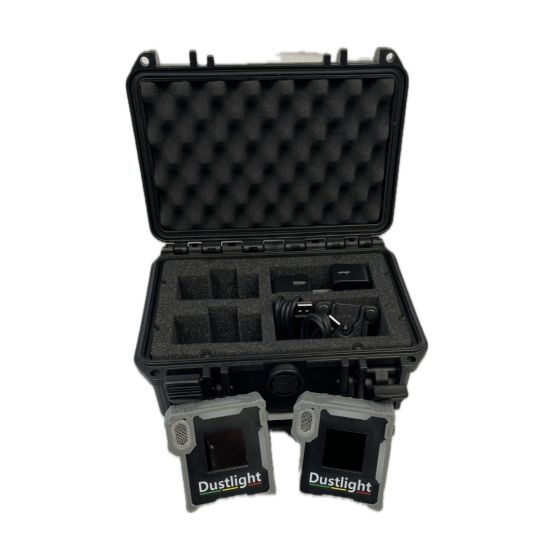
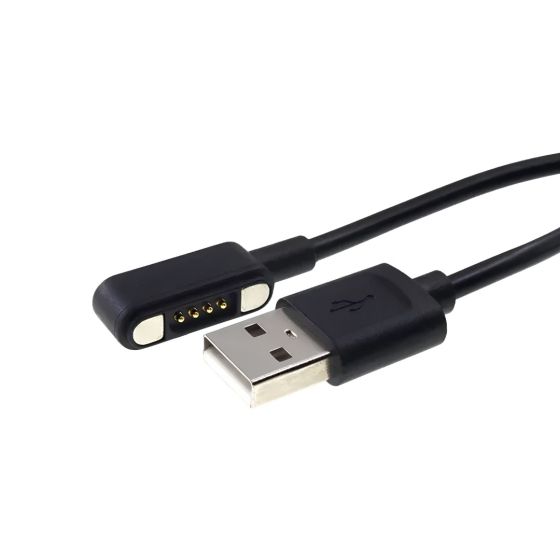
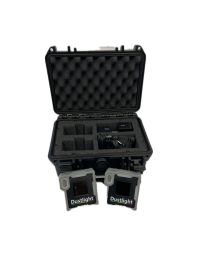
The IP67 Hard Case is rated completely dustproof and withstands immersion in up to one metre of water for 30 minutes. The custom foam interior holds two Dustlight units in dedicated slots and includes a section for the charging cables. Note that the case is a storage and transport solution, do not charge units with the lid sealed, as heat build-up can occur.
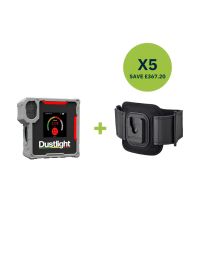
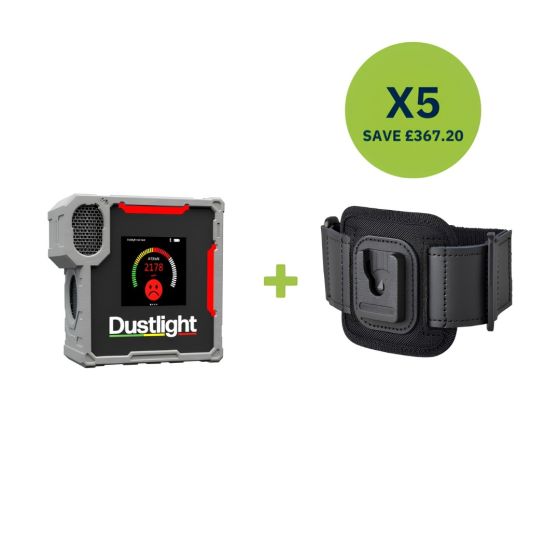
For sites running more than two units, multiple cases can be used in parallel. The Dustlight Workforce 5 Kit provides five units with armbands and connectors included for immediate team deployment.
The complete Dustlight range at CMT Group
All Dustlight products and accessories are stocked by CMT Group. Order by 7pm for next-day delivery nationwide.
Gravimetric sampling vs real-time monitoring: using both
One of the most common questions from UK site managers is how the Dustlight fits alongside the formal dust monitoring their occupational hygienist carries out. The short answer is that they serve different purposes and work best together.
| Attribute | Gravimetric sampling | Real-time monitoring (Dustlight) |
|---|---|---|
| Measurement method | Particles collected on filter, weighed in laboratory | Photometric laser, counts and sizes particles in real time |
| Result timing | Days to weeks after sampling | Immediate, readings every second |
| Compliance use | Required for formal WEL compliance under COSHH / EH40 | Indicative, not accepted as formal compliance measurement |
| Worker feedback | None during exposure, data reviewed after the fact | Real-time alerts prompt immediate action |
| Frequency | Periodic, typically during specific assessments | Continuous throughout every shift |
| Cost per measurement | Higher, requires specialist and laboratory analysis | Lower, device worn daily at no per-measurement cost |
| Identifying dust hotspots | Limited, fixed sampling point or single wearer | Immediate, move the device to map concentrations |
| Evaluating controls | Slow, results take time to feed back into decisions | Immediate, see the effect of turning on LEV in real time |
| Data for COSHH documentation | Required for formal risk assessment | Useful supporting data, not a substitute |
The practical workflow that works best for UK sites is to use the Dustlight for continuous day-to-day exposure awareness and RPE prompting, and to commission periodic gravimetric sampling by an occupational hygienist to fulfil the formal COSHH assessment requirement. The Dustlight data, showing which tasks, times of day, and locations produce the highest concentrations, can help the hygienist focus the formal sampling on the highest-risk activities, making the formal assessment more targeted and cost-effective.
When commissioning gravimetric sampling, share the Dustlight's 8-hour history data and the app's measurement records with your occupational hygienist in advance. This helps them prioritise which tasks and workers to sample, and provides useful context for interpreting the formal results.
Frequently asked questions
What does the Dustlight actually measure?
The Dustlight measures airborne particulate concentrations in real time using a photometric laser sensor. It reports PM1 (particles up to 1 micrometre), PM2.5, PM10, and respirable dust, the fine particle fraction that penetrates deepest into the lungs. Readings are displayed in micrograms per cubic metre (µg/m³) and update continuously during the shift.
Is the Dustlight suitable for use on a UK construction site?
Yes, for indoor and covered construction environments. The Dustlight is designed for commercial and industrial workplaces including construction sites, workshops, and production facilities. It is not waterproof, so it must be protected from rain and direct splash water during outdoor use. In practice, most high-dust construction tasks, cutting, grinding, drilling, breaking, take place in covered or enclosed areas where the device performs well.
Is the Dustlight a replacement for gravimetric dust sampling?
No. The Dustlight provides indicative measurements. It is a tool for real-time personal exposure awareness and prompting RPE use, it is not a certified compliance instrument for formal occupational exposure limit measurements under COSHH Regulations 2002. Where legally binding dust measurements are required, accredited gravimetric sampling by a competent occupational hygienist is the required method. The Dustlight is most valuable used alongside formal assessment, not instead of it.
Why are the default limit values set for Germany, not the UK?
The Dustlight is manufactured by Latai GmbH in Germany, and units sold elsewhere ship with German TRGS 900 default values. Units supplied by CMT Group are preset to United Kingdom limit values before dispatch, so no country change is needed on first connection. Operators are responsible for verifying and adjusting these values against the specific Workplace Exposure Limits in HSE EH40 for the substances present on their site.
How long does the battery last?
It depends on the operating mode. Standard Battery Life (the default) provides up to 20 hours, which covers most UK working shifts. ECO Battery Life extends battery life up to 40 hours by reducing measurement frequency in passive mode and dropping display brightness. Continuous Battery Life provides up to 7 hours with the fastest measurement intervals across the entire shift.
Does the Dustlight need to be calibrated regularly?
Not by the user. The device arrives pre-calibrated. Maintenance and recalibration must be carried out by Latai GmbH or an authorised Dustlight Service Partner at least every 12 months, or sooner in heavy-use environments. The device and app provide advance notice when the service interval is approaching. Annual maintenance can be arranged via dustlight.de or through CMT Group.
What is the difference between Basic, Business, and Corporate software plans?
Basic is free and included with every device. It covers real-time display, local data storage, CSV export, and configuration of alert limits. Business adds cloud storage, STEL and TWA exposure monitoring, event logging, and additional material configurations including wood dust, welding fumes, and diesel particulate, all relevant to UK COSHH management. Corporate adds full fleet management and centralised multi-team data analysis for larger organisations. Business and Corporate require a paid licence token per device, purchased via CMT Group.
How many units can I deploy across a team?
There is no upper limit on the number of units you can deploy. Devices are managed through the Dustlight app within your organisation. The Dustlight Workforce 5 Kit is the most cost-effective starting point for team deployments, providing five complete monitoring setups with armbands and connectors included. Additional individual units and accessories are available from CMT Group. For organisations deploying more than ten units, the Corporate software plan provides the fleet management tools to manage all devices centrally.
Is the data stored by the Dustlight app GDPR compliant?
Yes. All data transfers within the Dustlight platform are end-to-end encrypted. The platform is designed to meet GDPR requirements. Measurement data is linked to the organisation's account and cannot be accessed by other organisations. If a device is removed from an organisation, the measurement data stored on the device is not automatically deleted, a factory reset must be performed manually if full data deletion is required.
Can I use the Dustlight to evaluate whether my dust extraction system is working?
Yes, and this is one of the most practical uses of the Dustlight beyond personal protection. Run the device in the work area with the LEV switched off, then switch the extraction on and watch the readings in real time. The 8-hour history graph on the device and the full measurement record in the app give a clear before-and-after picture of whether the extraction system is reducing concentrations to the expected level. This kind of quick check supports COSHH Regulations 2002 requirements to monitor the effectiveness of controls.
How can I order Dustlight products and get them delivered to site?
All Dustlight products and accessories are available from CMT Group at cmt.co.uk. Order by 7pm for next-day delivery nationwide. CMT operates its own delivery fleet covering over 95% of the UK mainland with live tracking and What3Words integration for delivery directly to a site compound entrance or welfare unit. For volume orders or contract pricing on multi-unit deployments, contact the CMT sales team on 020 8311 1144 or email sales@cmt.co.uk.